

Nikon Wireless Transmitter WT-4 Software Driver and Firmware (Version 1.1) update for Microsoft Windows and Macintosh Operating Systems.
Nikon Wireless Transmitter WT-4 Software Downloads
Operating System (s) : Microsoft Windows Vista, Windows Xp
Description:This service provides software for updating UT-1 firmware to Ver. 2.3.If the firmware installed on your product is already the version noted above, this update is not necessary.Connect the UT-1 to a camera to update UT-1 firmware. See Cameras that can be used to update UT-1 firmware for information on supported cameras.When using the UT-1 running firmware Ver. 2.3, be sure that the Wireless Transmitter Utility is Ver. 1.5.4 or later.
Confirming the firmware version:
- Set the supported camera to MTP/PTP mode if applicable, switch off camera.
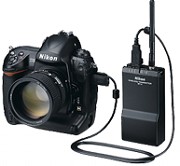
- Connect the USB cable to the camera and the WT-4 and turn both devices on.
- Press the camera MENU button and select Wireless transmitter> Device Info in the setup menu.
- Select Firmware version.
- The currrent firmware version will be displayed.
- Turn off camera and WT-4.

Basic Download and Nikon WT-4 Installation instructions for Windows and Macintosh:
- Create a new folder with an appropriate name on your computer’s hard drive.
- Download WT4Update.zip to the folder created in step 1.
- Unzip WT4Update.zip to create the folder named WT4Update containing the file _WT411_.bin : the firmware.
- Copy the WT4Update folder to a memory card using a card reader.
- Insert the memory card in camera card slot (slot one if dual slot equipped).
- Repeat steps 1-5 under “Confirming the firmware version” above. This time there will be an Update? option.
- Highlight Update, and press OK
Windows: for firmware detailed installation instructions click here (English and .PDF format)
Macintosh: for firmware detailed installation instructions click here.
Modifications/Note for Nikon Wireless Transmitter WT-4 Firmware Version 1.1:
- Support for Thumbnail Selector 1.1.0 has been added.
- Users of the D3:When using the WT-4 with firmware ver.1.1, be sure that the D3 A and B firmware are both version 2.00, the Thumbnail Selector is version 1.1.0 or later, and the WT-4 Setup Utility is version 1.1.0 or later.Be sure to download the latest version(s) from our website and perform the necessary upgrades.
- Users of the D300:Be sure to upgrade the D300 to the latest firmware version before using this software. Please click here for the latest D300 firmware.
- Users of the D700:The D700 has a firmware upgrade available, please be sure to check the Firmware link below to upgrade your camera.
Operating System (s) : Mac OS X 10.1.5, Mac OS 10.2, Mac OS 10.3, Mac OS 10.4, Mac OS 10.5.3
- Nikon WT-4 Mac Firmware – Download (904KB)
Download the software, firmware and drivers to keep your Nikon Wireless Transmitter WT-4.

