

Nikon Df Digital SLR Camera Software Driver and Firmware (Version C:1.01) update for Microsoft Windows and Macintosh Operating Systems.
Nikon Df Software Downloads
Operating System (s) : Microsoft Windows 8.1, Windows 7
Operating System (s) : Microsoft Windows Vista, Windows Xp
Confirming the firmware version:
- Turn on the Nikon Df
- Press the MENU button and select Firmware Version from the setup menu.The camera’s firmware version will be displayed.
- Turn off the Nikon Df
Basic Download and Nikon Df Installation instructions for Windows and Macintosh: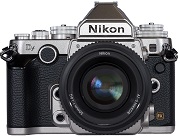

- Create a new folder with an appropriate name on your computer.
- Choose the correct download below for the computer system you are using below, and save the download to the folder created in step 1.
- Run the downloaded file to create the folder titled DFUpdate, containing the following file: DF_0101.bin.
- Format an approved memory card in the camera, then remove.
- Copy the DF_0101.bin file to the top level of the memory card using a memory card reader or similar device, do not copy the file into any folder on the memory card.
- Insert memory card into the cameras memory card slot, and switch on.
- Select Firmware Version from the setup menu and follow the instructions displayed to upgrade the Nikon Df camera’s firmware.
- DO NOT switch off the camera at any time during the update, doing so may result in the need for service.
- After the upgrade is complete, trun the camera off and remove the memory card.
- Check the cameras firmware version to be sure it completed.
- Format memory card in camera for use.
Modifications/Note for Nikon Df DSLR Firmware Version C:1.01:
- When Press for Custom Setting f4 (Assign Fn button) , f5 (Assign preview button) , or f6 (Assign AE-L/AF-L button) was set to Preview, and the camera’s Fn button, Pv button, or AE-L/AF-L button was pressed, while viewfinder shooting using a Speedlight SB-800, a preview was not displayed in the camera monitor and a modeling flash was not fired. This issue has been resolved.When a Speedlight that does not support Auto FP high-speed sync was used with Custom Setting e1 (Flash sync speed) set to 1/250 s (Auto FP), the maximum shutter speed was 1/200 s.This issue has been resolved.When images captured with Auto ISO sensitivity control in the shooting menu set to Off were displayed in ViewNX 2 or Capture NX 2, Auto (ISO XXX) was incorrectly displayed for ISO Sensitivity in Metadata. This issue has been resolved.
Operating System (s) : Mac OS 10.6.8, Mac OS 10.7, Mac OS 10.8, Mac OS 10.9.x
- Nikon Df Mac Firmware – Download (11.9MB)
Download the software, firmware and drivers to keep your Nikon Df DSLR Camera.

