

Nikon D750 Digital SLR Camera Software Driver and Firmware (Version C:1.01/1.10) update for Microsoft Windows and Macintosh Operating Systems.
Nikon D750 Software Downloads
Operating System (s) : Microsoft Windows 8.1, Windows 7, Windows Vista
- Nikon D750 Win 8.1 Firmware – Download (19.4MB)
- Nikon D750 Win 7 Firmware – Download (19.5MB)
- Nikon D750 Win Vista Firmware – Download (19.3MB)
Confirming the firmware version:
- Turn on the Nikon D750
- Press the MENU button and select Firmware Version from the setup menu.The camera’s firmware version will be displayed.
- Turn off the Nikon D750
Basic Download and Nikon D750 Installation instructions for Windows and Macintosh: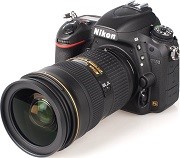

- NOTE: Use a fully charged Li-Ion battery (EN-EL15) or connect the AC adapter (EH-5B +EP-5b power connector) to upgrade firmware. Do not use the Multi-Power Battery Pack MB-D16 to perform this upgrade.
- Create a new folder with an appropriate name on your computer.
- Choose the correct download below for the computer system you are using below, and save the download to the folder created in step 1.
- Run the downloaded file to create the folder titled D750Update, containing the following file: D750_0101.bin.
- Format an approved memory card in the camera, then remove.
- Copy the D750_0101.bin file to the top level of the memory card using a memory card reader or similar device, do not copy the file into any folder on the memory card.
- Insert memory card into the cameras memory card slot, and switch on.
- Select Firmware Version from the setup menu and follow the instructions displayed to upgrade the Nikon D750 camera’s firmware.
- DO NOT switch off the camera at any time during the update, doing so may result in the need for service.
- After the upgrade is complete, trun the camera off and remove the memory card.
- Check the cameras firmware version to be sure it completed.
- Format memory card in camera for use.
Modifications/Note for Nikon DSLR D750 Firmware Version C:1.01:
- When shooting with an optional Speedlight and Auto FP high-speed sync enabled with On selected for ISO sensitivity settings > Auto ISO sensitivity control in the photo shooting menu, images were sometimes over-exposed. This issue has been resolved. (Enabling auto FP high-speed sync: Select 1/200 s (Auto FP) or 1/250 s (Auto FP) for Custom Setting e1: Flash sync speed)When menus were displayed with the camera connected to a 4K-compatible TV via HDMI, display in both the camera monitor and on the TV was not correct. This issue has been resolved.Noise that could sometimes be heard when Custom Setting d1: Beep was set to any option other than Off has been reduced.
Software:
- Nikon D750 Picture Control Utility 2.1.0 Software
- Nikon D750 Distortion Control Data V2 Software
- Nikon D750 View NX 2.10.3 Software
- Others
Operating System (s) : Mac OS 10.6.8, Mac OS 10.7, Mac OS 10.8, Mac OS 10.9.2, Mac OS 10.10.1
- Nikon D750 Mac Firmware – Download (20.7MB)
Download the software, firmware and drivers to keep your Nikon D750 DSLR Camera.

