

Nikon D3X Digital SLR Camera Software Driver and Firmware (Version A:1.01 / B:1.02) update for Microsoft Windows and Macintosh Operating Systems.
Nikon D3X Software Downloads
Operating System (s) : Microsoft Windows 8, Windows 7
Operating System (s) : Microsoft Windows Vista, Windows Xp
Confirming the firmware version:
- Turn on the Nikon D3X
- Press the MENU button and select Firmware Version from the setup menu.The camera’s firmware version will be displayed.
- Turn off the Nikon D3X
Basic Download and Nikon D3X Installation instructions for Windows and Macintosh: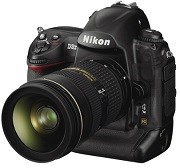

- Create a new folder with an appropriate name on your computer.
- Choose the correct download below for the computer system you are using, and save the download to the folder created in step 1.
- Run the downloaded file to create the folder titled D3X Update, containing the following files:
- AD3X0101.bin: the A firmware, BD3X0102.bin: the A firmware
- Connect the camera to the computer via USB cable (be sure the camera’s USB item in the setup menu is set to Mass Storage), or use a card reader, and copy the downloaded A firmware to a memory card formatted by the camera and inserted in the camera or card reader.
- If the camera was connected to the computer, use standard OS procedure to disconnect the camera from the computer.
- Insert the memory card containing the firmware in the Nikon D3X camera’s memory card slot 1 and turn on the camera.
- Select Firmware version from the setup menu and follow the instructions displayed in the monitor to upgrade the firmware.
- After the upgrade is complete, turn the camera off and remove the memory card.
- Format the memory card with the camera and repeat steps 4 – 8 to update B firmware.
- Once firmware update is complete, confirm the camera’s firmware verison. If you changed the USB setting to perform this update, it may now be changed back to MTP/PTP.
Modifications/Note for Nikon DSLR D3X Firmware Version A:1.01 / B:1.02:
- Support for the AF-S NIKKOR 800mm f/5.6E FL ED VR has been added.Modifications enabled with this upgrade of firmware, release date January 6, 2010: Support for 64 GB memory cards has been added.When some memory cards were inserted in the camera, “CHA” was displayed in the top control panel and images could not be captured. This issue has been resolved.
Operating System (s) : Mac OS 10.1.5, Mac OS 10.2, Mac OS 10.3, Mac OS 10.4, Mac OS 10.5, Mac OS 10.6, Mac OS 10.7, Mac OS 10.8.2
- Nikon D3X Mac Firmware – Download (2.1MB)
Download the software, firmware and drivers to keep your Nikon D3X DSLR Camera.

